
Touch POS billing software for Android tablets & Windows touch screens
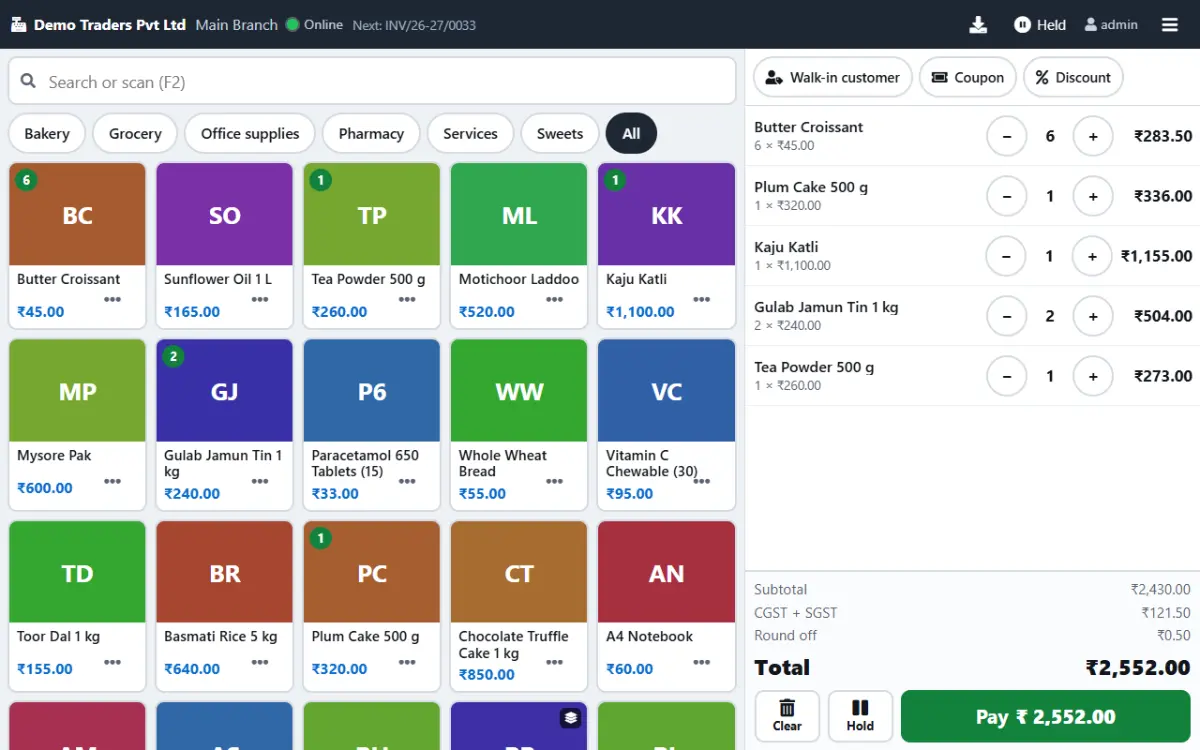
Paybot Touch POS is touch billing software for busy counters: big photo tiles, no keyboard, and a Pay button that is always in reach. It runs on an Android tablet or a Windows touch screen, and every bill is the same GST invoice your office already uses.
What a billing counter needs
A touch screen billing system has to be faster than the queue in front of it. These are the three things that slow most counters down.
Keyboards slow the cashier
Typing names or codes into a desktop billing screen takes longer than the customer is willing to wait.
With Paybot: A product grid with photos and categories, a Favourites tab and top sellers first. Tap to add, long-press for quantity, price or discount.
Staff wander into the wrong menus
A full accounting screen at the counter means a cashier can open reports, edit products or delete bills by mistake.
With Paybot: The Cashier role lands straight on the POS after sign-in. Back to admin shows only for people who have rights beyond billing.
Two systems that never agree
A separate POS box keeps its own stock and sales, and someone retypes the totals into the accounts every night.
With Paybot: Each POS bill is a regular GST invoice, so stock, loyalty points, receipts and reports update the moment the bill is paid.
Touch POS features
Everything on this list ships in the standard product. Tap a card for the full details on the features page.
Finger-first grid
Photo tiles or coloured initials, small, medium or large tile sizes, product groups as tabs and a search box that also takes barcodes.
Billing by weight or amount
Enter 250 g, 1.5 kg or ₹100 and Paybot works out the quantity. Scale barcode labels are read from the print on the label.
Hold and resume
Hold a bill with a label, serve the next customer and resume it later from any counter in the same branch.
UPI QR and split payments
Cash, UPI, card or other tiles, quick-tender amounts, change due, and any mix of tenders on one bill. The UPI QR for the amount shows on screen.
Receipt or WhatsApp
Print an 80 mm, 58 mm or A4 receipt right after payment, ask each time, or send the bill on WhatsApp when a phone number is given.
Customers and loyalty
Type a phone number to find the customer, see their points and redeem them on the bill. Coupons and schemes apply as on any invoice.
Cashier role
Cashiers see the POS and nothing else. Price edits and line discounts can be switched off or capped per company or branch.
Works offline
Install the POS as an app. If the internet drops, walk-in billing carries on and the bills sync when the connection is back.
Same reports
POS sales sit in the daily sales report, GST returns, stock and the day book with every other invoice. No end-of-day import.
How a sale works on the touch POS
Four steps from the first tap to the printed receipt.
Open the POS
The cashier signs in and lands on the grid. Favourites and top sellers show first.
Build the bill
Tap tiles, scan barcodes or weigh items. Tap a line to change the quantity, batch or discount, or swipe it away.
Take payment
Pay shows the amount due. Pick cash, UPI or card, or add a second payment for a split bill.
Print and move on
The receipt prints or goes on WhatsApp, stock and points update, and the screen is ready for the next customer.
Hardware that works with Paybot Touch POS
Paybot runs in the browser or the Android app, so it uses hardware your device already supports. No special drivers from us.
Android tablet
Any Android 7.0 or newer tablet with the Paybot Android app. Counter mode hides the system bars and keeps the screen on while the POS is open.
Windows touch screen
An all-in-one touch PC or a touch monitor with Chrome or Edge. The POS layout splits grid and bill side by side on a landscape screen.
Barcode scanner
A USB scanner, or a Bluetooth scanner paired as a keyboard (HID mode). The POS recognises fast keystrokes ending in Enter as a scan.
Thermal printer
On Windows, use the printer's own driver; Chrome's kiosk printing mode prints without a dialog. On Android, install the printer's print service app and pick it once.
Why Paybot
Touch billing that stays part of your accounts.
Your data, your server
Each company gets its own database, on our cloud or self-hosted on your own servers, with backups and Excel export built in.
Controls for owners
Role-based permissions, an audit trail of every change, and paid or filed documents that need Approve rights to change.
One product, every screen
The touch POS, the keyboard billing screen and the A4 invoice share one product list, one number series and one set of reports.
Plans and pricing
Plans depend on how many people and companies use Paybot, and whether it runs on our cloud or your own servers.
Touch POS questions
What is touch billing software?
It is a billing screen designed for fingers instead of a keyboard and mouse: big tiles for products, number pads for quantity and one large Pay button. Paybot Touch POS works this way on tablets and touch monitors, and also with a mouse if you prefer.
Which devices can run the touch POS?
An Android tablet with the Paybot Android app (Android 7.0 or newer), or a Windows touch PC or touch monitor with Chrome or Edge. A phone works too: the bill becomes a sheet at the bottom of the screen.
Will my thermal receipt printer work?
Most will. On Windows, install the printer's driver and print 80 mm or 58 mm receipts from the browser. On Android, Paybot prints through Android's print system, so the printer needs a print service app from its maker or a generic ESC/POS print service. Android shows its print dialog for each receipt.
What happens if the internet goes down?
If the POS is installed as an app, walk-in billing continues offline and a provisional receipt prints. Bills sync and get their final numbers when you are back online. Coupons, schemes and loyalty redemption need a connection.
Is a touch POS bill a proper GST invoice?
Yes. It is saved as a regular walk-in invoice with HSN codes, CGST and SGST, the next number from your invoice series and the audit trail, exactly like a bill made on the desktop screen.
Can two counters bill at the same time?
Yes. Each counter signs in as its own user, and held bills are shared across the counters of a branch. More than one user is the multi-user plan: contact us for pricing.
Related pages
Where this part of Paybot fits for other businesses and features.
POS billing
Barcode billing with GST, variants, MRP, loyalty and stock.
Offline billing
Keep billing at the counter when the internet drops, then sync.
Android app
Paybot on Android phones and counter tablets.
Bakery
Touch POS with photos, sold by weight, auto-print receipts.
Sweet shop
Weight billing, scale barcodes and hold bills for the festival rush.
Café & restaurant counter
Fast counter billing, split payments and a daily sales report.
See the touch POS on your own products
Message us on WhatsApp and we will show Paybot Touch POS with your items and your printer. Or call +91 80755 95200.