
POS billing software with GST, barcode & inventory
Paybot is POS billing software that connects the counter to your stock and accounts. Scan a barcode, take cash or UPI and print an 80 mm receipt, while GST, inventory and loyalty points update on their own.
What a shop counter needs from POS software
Billing software for a shop has to be quick at the counter and correct in the books. These are the usual weak spots.
Long queues at peak time
Searching for items and working out change by hand turns a two-minute bill into five.
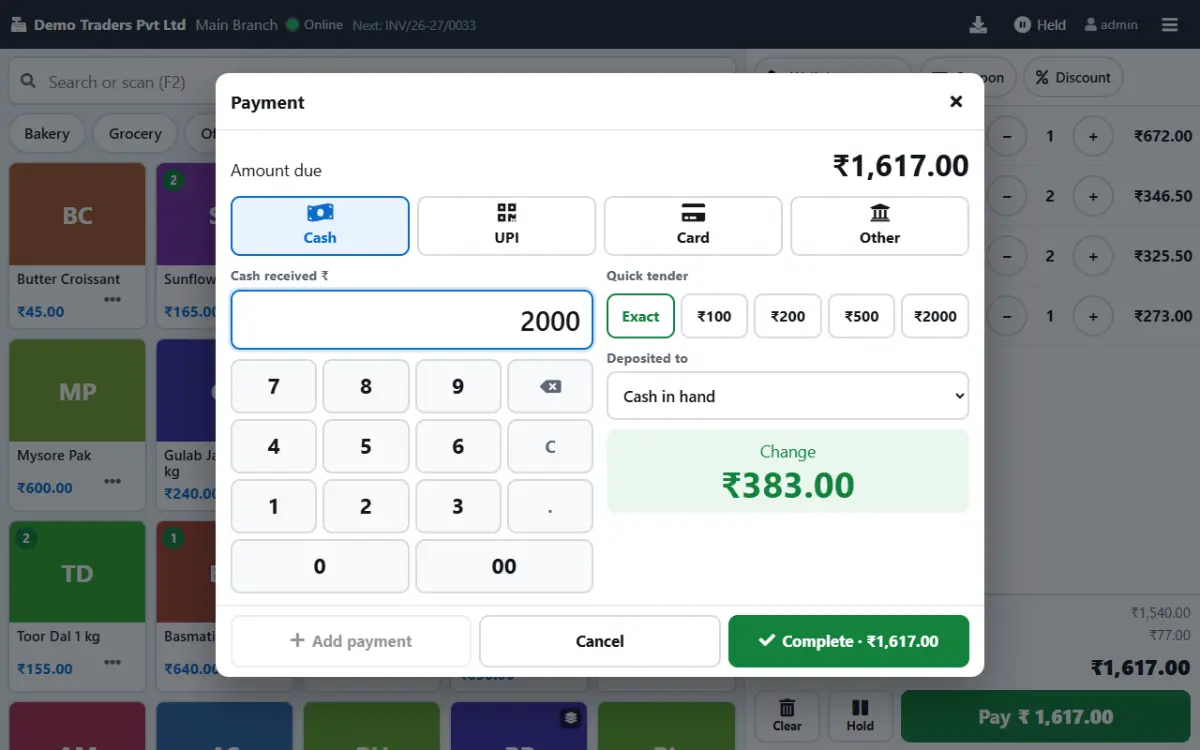
With Paybot: Scan the barcode, press the quick-tender amount and Paybot shows the change. A walk-in customer is created from a phone number in seconds.
Stock that never matches
When the POS and the stock register are separate, the shelf and the system drift apart within weeks.
With Paybot: Every POS bill takes stock out of the branch it was billed in, at weighted-average cost, and a low-stock list tells you what to reorder.
GST mistakes on mixed bills
One basket can hold items at 5%, 12% and 18% GST, some priced with tax included on the MRP.
With Paybot: Each product carries its HSN code and GST rate, and prices can be tax-inclusive. Paybot splits the tax per line and reports it in GSTR-1.
POS billing features
Two ways to bill at the counter, both feeding the same stock and reports.
Barcode billing
Scan product, variant or batch barcodes. Print your own EAN-13 or Code 128 labels for items that come without one.
Variants and packs
Sizes, colours and package variants under one base product, each with its own price, barcode and stock.
MRP and price lists
MRP per batch, tax-inclusive pricing, party price lists, minimum price checks and the last price sold to a customer.
Quick tender
Cash tendered and change due worked out for you, with UPI QR, card and split payments.
80 mm receipts
Thermal receipts with the GST split and a UPI QR, or a full A4 tax invoice for business customers.
Loyalty and offers
Points on every bill, bonus points above a bill value, schemes with free quantity and coupon codes.
Live stock
Stock per branch and variant, low-stock warnings, stock count sheets and transfers between outlets.
Daily sales report
The DSR shows the day's sales by payment mode, and the day book lists every receipt and payment.
Touch POS option
Prefer tablets? The touch POS uses the same products and prices with big photo tiles.
How POS billing works in Paybot
The same four steps whether you bill with a scanner or a touch screen.
Set up products once
Import products from Excel with HSN code, GST rate, price and barcode, or add them one by one.
Scan and bill
Scan or search items on the Walk-In (POS) tab of the billing screen, or tap tiles on the touch POS.
Collect payment
Cash with change due, UPI QR, card, or a split across modes. A receipt is recorded for each.
Close the day
Check the daily sales report, stock on hand and GST summary without exporting anything.
Why Paybot
POS software that stays in step with the office.
Your data, your server
Each company gets its own database, on our cloud or self-hosted on your own servers, with backups and Excel export built in.
Controls for owners
Role-based permissions, an audit trail of every change, and paid or filed documents that need Approve rights to change.
Counter bills are real invoices
POS sales show in GST returns, customer ledgers and the Tally export like every other invoice, so nobody re-enters them.
Plans and pricing
Plans depend on how many people and companies use Paybot, and whether it runs on our cloud or your own servers.
POS billing questions
Does Paybot have a keyboard POS and a touch POS?
Yes. The billing screen has a Walk-In (POS) tab for keyboard and barcode scanner billing at a desk counter, and the touch POS is a separate full-screen view for tablets and touch monitors. Both save the same kind of invoice.
Which barcode scanners are supported?
Any USB scanner, or a Bluetooth scanner paired as a keyboard. Paybot reads product, variant, batch and serial barcodes, and scale labels on the touch POS.
Can I bill items with MRP and tax included?
Yes. Mark a product's price as including GST and Paybot works the taxable value back from the price. MRP can be stored per batch and prints on the bill.
Does POS billing reduce stock automatically?
Yes, for products that track stock. The sale comes off the branch it was billed in, and batch or serial numbers are picked where you use them.
Can I print on 80 mm thermal paper?
Yes. Paybot has 80 mm and 58 mm thermal layouts and A4 layouts, with your logo and a UPI QR. Bills can also go out on WhatsApp.
How much does it cost?
Counter billing is in every plan from ₹11,999/year. The touch POS with cash register, loyalty and barcode billing is in Growth at ₹17,999/year for 5 users and 2 branches; extra counters are ₹150 per user and extra branches ₹500 per branch per month.
Related pages
Where this part of Paybot fits for other businesses and features.
Touch POS
Finger-first billing on Android tablets and Windows touch screens.
GST billing
CGST, SGST, IGST, HSN and GSTR-1 / 3B exports from your invoices.
Inventory management
Batch, serial and multi-branch stock with weighted-average cost.
Retail & supermarket
Barcodes, MRP, schemes, loyalty points and multi-branch stock.
Bakery
Touch POS with photos, sold by weight, auto-print receipts.
Pharmacy
Batch, expiry and MRP with FEFO and a near-expiry report.
See POS billing with your own items
Message us on WhatsApp and we will set up a counter with your products, barcodes and receipt printer. Or call +91 80755 95200.