
Offline billing software (PWA)
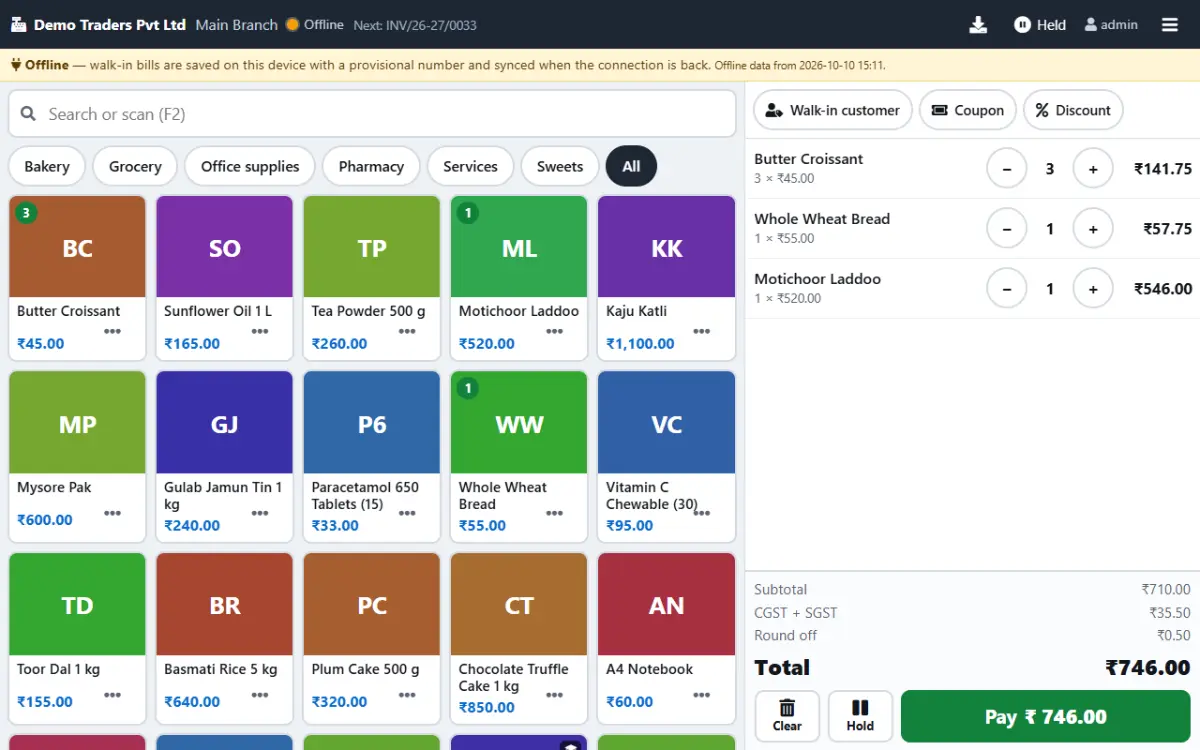
Install the Paybot touch POS as an app on your counter device and it keeps billing when the internet drops. Bills are stored on the device, receipts still print, and everything syncs to your account when the connection comes back.
What a counter needs when the internet fails
Cloud billing is convenient until the connection drops in the middle of a queue.
The queue does not wait
When the internet goes, a cloud billing screen stops, and customers leave or get handwritten bills.
With Paybot: The POS keeps working from the product list stored on the device. Bills get a provisional number and the receipt prints.
Bills lost or entered twice
Paper bills written during an outage are typed in later, some twice and some never.
With Paybot: Offline bills wait in an outbox on the device and sync in order. Each bill has its own reference, so a bill is never saved twice.
Not knowing what changed
Prices or stock may change while a counter is offline.
With Paybot: Sync records every difference, such as a changed price or stock going negative, on the POS Devices page for review.
Offline billing features
Built into the touch POS. No separate offline program to install or update.
Install as an app
Install the POS from Chrome or Edge on Windows and Android, or use it inside the Paybot Android app.
Catalog on the device
Products, prices, GST rates, batches and customers are stored on the device and refreshed every 15 minutes.
Provisional receipts
Offline bills print a receipt with a provisional number in the form OFFLINE-device-sequence.
Automatic sync
When the connection returns, bills sync in order and get their real numbers from your invoice series.
Device register
Each counter device registers itself. See devices, last sync, synced and failed bills, or switch a device off.
Held bills offline
Hold and resume bills while offline. They are kept on that device until it is back online.
How offline billing works
What happens on the counter device from install to sync.
Install the POS
Open the touch POS online once and install it as an app. The product list is stored on the device.
Internet drops
The POS switches to offline mode and shows it on screen. Walk-in billing carries on as normal.
Bills wait in the outbox
Each offline bill is saved on the device with a provisional number, and its receipt prints.
Sync on reconnect
When the connection is back, bills sync, get real invoice numbers and update stock and reports.
Why Paybot
Offline billing without losing control.
Your data, your server
Each company gets its own database, on our cloud or self-hosted on your own servers, with backups and Excel export built in.
Controls for owners
Role-based permissions, an audit trail of every change, and paid or filed documents that need Approve rights to change.
Nothing leaks between users
When another user signs in on the device, the previous user's data is cleared. Unsynced bills are kept and synced, never deleted.
Plans and pricing
Plans depend on how many people and companies use Paybot, and whether it runs on our cloud or your own servers.
Offline billing questions
What works offline?
Walk-in billing on the touch POS: products, prices, GST, barcodes, batches, cash, UPI and card payments, held bills and receipts. Credit invoices to business customers, coupons, schemes, loyalty redemption and reports need a connection.
How do offline bills get their invoice numbers?
Offline bills carry a provisional number. At sync each one gets the next number from your invoice series and keeps the date it was billed.
What if a price changed while I was offline?
The bill is synced as billed, and the difference is listed on the POS Devices page so a manager can review it.
Do I have to stay signed in?
Yes. Bills sync under the signed-in user. If the session has expired, the POS asks you to sign in again before it syncs.
Which devices support offline billing?
Chrome or Edge on Windows and Android, and the Paybot Android app. Automatic background sync works on Chromium browsers; otherwise bills sync when the POS is open.
Can bills be lost if the device is switched off?
No. Offline bills are stored on the device and sync the next time the POS opens online.
Related pages
Where this part of Paybot fits for other businesses and features.
Touch POS
Finger-first billing on Android tablets and Windows touch screens.
Android app
Paybot on Android phones and counter tablets.
POS billing
Barcode billing with GST, variants, MRP, loyalty and stock.
Bakery
Touch POS with photos, sold by weight, auto-print receipts.
Sweet shop
Weight billing, scale barcodes and hold bills for the festival rush.
Café & restaurant counter
Fast counter billing, split payments and a daily sales report.
See offline billing for yourself
Message us on WhatsApp and we will show the POS billing with the internet switched off. Or call +91 80755 95200.