
Sweet shop billing software
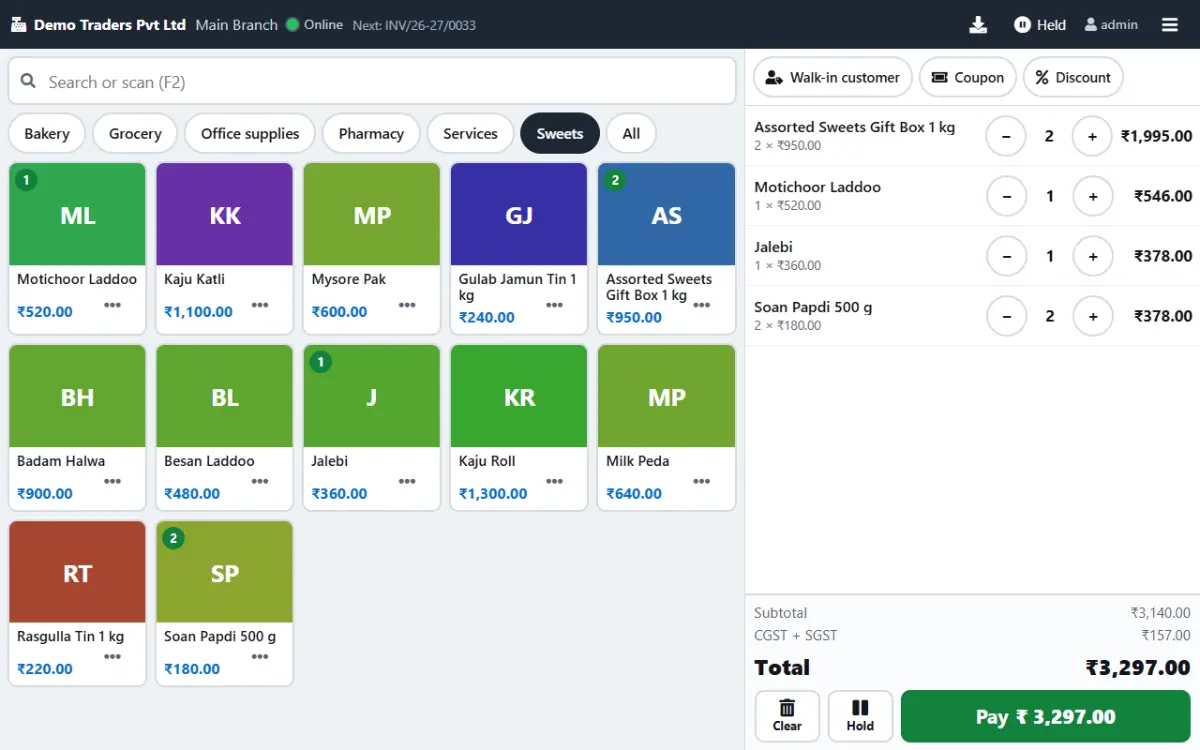
Paybot is built for mithai and namkeen counters where almost everything is weighed and Diwali brings five times the usual queue. Bill by gram or rupee, keep gift boxes as ready packs and let GST follow each item's HSN code.
What a sweet shop needs
Weighing, festival queues and mixed tax rates are where sweet shop billing usually goes wrong.
Everything is weighed
Sweets go out by 100 g, a quarter kilo or a rupee amount, and every conversion done in the head is a chance to lose money.
With Paybot: Enter the weight in g or kg, or type ₹200, and Paybot calculates the quantity. Labels from a weighing scale are read as scale barcodes.
Festival rush
During Diwali, Raksha Bandhan and the wedding season the counter is three deep and customers keep adding items.
With Paybot: Hold a half-made bill and serve the next customer. Favourites, quick-tender buttons and an instant cash key keep each bill short.
Gift boxes and mixed GST
Boxes of assorted sweets, namkeen and packaged items carry different HSN codes and GST rates.
With Paybot: Gift boxes are package variants with their own price and barcode, and every line is taxed on its own HSN code.
Sweet shop features
Built around the weighing scale, the festival calendar and the gift box.
Weight and amount billing
Grams, kilos or a rupee amount on the item sheet, with the price per kg kept on the product.
Scale barcode labels
Labels printed by a weighing scale carry the item code and weight. Scanning one adds the right line at once.
Hold bills
Park as many bills as you need during the rush and resume them from any counter.
Favourites tab
Put kaju katli, rasgulla and the day's specials on the first screen, with top sellers next.
Gift boxes as variants
Sell 250 g, 500 g and 1 kg boxes as package variants, each with its own price and barcode.
HSN-wise GST
Sweets, namkeen and bought-in packaged items each keep their own HSN code and GST rate on the same bill.
Festival schemes and coupons
Run schemes, free quantity and coupons for festival offers, and see how each scheme performed.
Loyalty points
Regular customers earn points and redeem them as a discount, with bonus-point offers for the festival season.
Bulk orders on A4
Wedding and corporate Diwali orders get a full A4 GST invoice with the buyer's GSTIN and delivery address.
How billing works at the sweet counter
Four steps, the same on an ordinary Tuesday and on Dhanteras.
Pick the item
Tap the sweet on the favourites screen or scan the label from the scale.
Enter the weight
Type 0.5 kg, 250 g or ₹300. The quantity and price fill in.
Hold or pay
If the customer is still choosing, hold the bill. Otherwise take cash, UPI or card, or split it.
Print or WhatsApp
Print the 80 mm receipt or send it on WhatsApp. Stock and the day's sales update at once.
Plans and pricing
Plans depend on how many people and companies use Paybot, and whether it runs on our cloud or your own servers.
Questions sweet shop owners ask
Sweets and namkeen have different GST rates. Can one bill handle both?
Yes. Every product has its own HSN code and GST rate, and Paybot works out tax line by line, so a bill with mithai, namkeen and a packaged item is taxed correctly. The HSN summary for your return is ready in the GST reports.
Can I bill directly from my weighing scale?
Paybot reads scale barcodes: the labels a weighing scale prints with the item code and the weight or price. Set the label format once in POS settings and scanning a label adds the line. It reads the label rather than connecting to the scale itself.
What happens if the internet fails on a festival day?
The touch POS keeps billing offline on the device and syncs the bills once you are back online. Bills you hold while offline stay on that device until you resume them.
Which devices do I need?
An Android tablet or a Windows touch screen for the counter, an 80 mm thermal printer and, if you use scale labels, a barcode scanner. A normal PC or laptop works too.
Can my accountant use the data?
Yes. Your accountant can take a Tally export, and GSTR-1 is available as JSON and Excel for filing.
Is my data mine if I stop using Paybot?
Yes. Your company has its own database. Export customers, products and reports to Excel, or take a full backup, at any time.
Related pages
Paybot is one product. Other businesses use the same features in a different way, and these features matter most in this line of business.
Bakery
Touch POS with photos, sold by weight, auto-print receipts.
Café & restaurant counter
Fast counter billing, split payments and a daily sales report.
Retail & supermarket
Barcodes, MRP, schemes, loyalty points and multi-branch stock.
Touch POS
Finger-first billing on Android tablets and Windows touch screens.
POS billing
Barcode billing with GST, variants, MRP, loyalty and stock.
GST billing
CGST, SGST, IGST, HSN and GSTR-1 / 3B exports from your invoices.
See Paybot set up for a sweet shop
Message us on WhatsApp and we will show weight billing and gift boxes with items like yours. Or call +91 80755 95200.