
Pharmacy billing software with batch & expiry
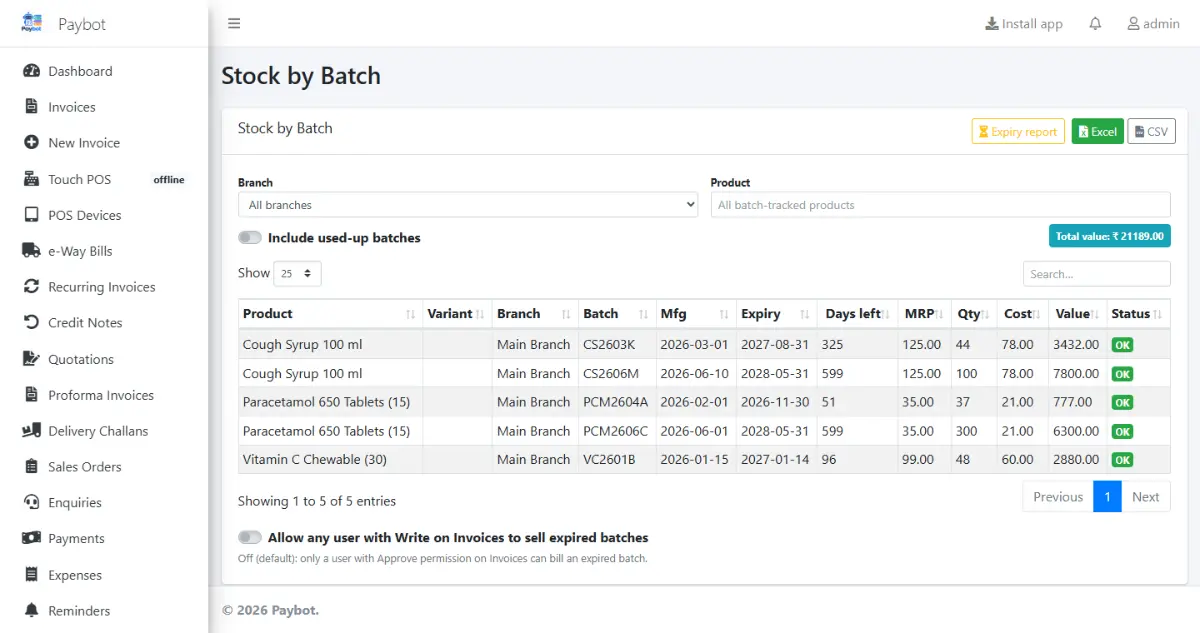
Paybot keeps every strip and bottle in your medical store under its batch, expiry date and MRP, and proposes the earliest-expiring batch when you bill. Purchases, returns to suppliers and GST returns sit in the same system.
What a pharmacy needs
Expiry, batch-wise MRP and supplier returns are where medical store billing gets hard.
Expired stock on the shelf
Medicines that expire unnoticed are lost money, and selling one is far worse.
With Paybot: First-expiry-first-out (FEFO) batch selection at billing and a near-expiry report, so you can return or clear stock in time.
Every batch has a different MRP
The same medicine arrives in batches with different MRPs and expiry dates, and the bill must show the right one.
With Paybot: Purchases record batch number, expiry and MRP. The bill picks a batch and prints its MRP.
Supplier returns and ITC
Breakages, short-dated stock and wrong supplies go back to the distributor, and Input Tax Credit must match what suppliers filed.
With Paybot: Debit notes for purchase returns update stock and payables, and GSTR-2B matching checks supplier bills before you claim ITC.
Pharmacy features
Batch stock from purchase to sale, and the GST work that follows.
Batch, expiry and MRP
Stock is held per batch with expiry and MRP, from the purchase bill onwards.
FEFO batch selection
Billing proposes the batch that expires first, and you can still choose another.
Near-expiry report
See which batches expire in the coming weeks, so you can plan returns and clearance.
HSN-wise GST
Each medicine carries its HSN code and GST rate, with GSTR-1, GSTR-3B and an HSN summary every month.
Purchases from distributors
Goods received with batches, supplier ledgers, bill-wise payments and payables ageing.
Purchase returns
Debit notes against supplier bills for breakage and expiry returns, reducing stock and payables.
GSTR-2B matching
Match supplier bills with GSTR-2B / IMS before claiming Input Tax Credit.
Barcode billing
Scan the pack barcode, or print your own labels for items that arrive without one.
Loyalty for regular customers
Points on every bill for families who buy monthly medicines, redeemed as a discount.
How billing works at the pharmacy counter
Batch and expiry are handled for you at every step.
Search or scan
Find the medicine by name or barcode. Paybot shows the stock by batch.
Batch is picked
The earliest-expiry batch is proposed with its MRP. Change it if the customer hands you another strip.
Bill and collect
GST is applied per item. Take cash, UPI or card, and print an A4 or 80 mm bill.
Restock and return
Low-stock items go on the next purchase, and near-expiry batches go back to the distributor on a debit note.
Plans and pricing
Plans depend on how many people and companies use Paybot, and whether it runs on our cloud or your own servers.
Questions pharmacy owners ask
Does Paybot keep Schedule H / H1 registers or check drug licences?
No. Paybot handles billing, GST, batch and expiry stock, purchases and accounts. It does not keep a Schedule H or H1 register, record prescriptions or check drug licence numbers, so keep those records as you do today.
How is GST applied on medicines?
Each product has its own HSN code and GST rate, so medicines, devices and general items on one bill are taxed at their own rates. Prices can be MRP-style, inclusive of GST.
Can I bill a near-expiry batch first?
Yes. Batch selection follows first expiry, first out by default, and the near-expiry report lists what needs to be sold or returned soon.
Will billing stop if the internet goes down?
The touch POS keeps billing offline when installed as an app, and bills sync when the connection is back.
Can I bring in my current products and stock?
Yes. Products and opening stock can be imported from Excel, and new purchases record batch, expiry and MRP as they arrive.
Who has the data, and can I back it up?
Your pharmacy has its own database. Backup and restore are built in, reports export to Excel, and the Enterprise plan runs Paybot on your own server.
Related pages
Paybot is one product. Other businesses use the same features in a different way, and these features matter most in this line of business.
Retail & supermarket
Barcodes, MRP, schemes, loyalty points and multi-branch stock.
Wholesale & distribution
B2B invoices, e-Invoice, e-Way Bill, credit limits and party rates.
Manufacturing
BOM, production orders, job work and component stock deduction.
Inventory management
Batch, serial and multi-branch stock with weighted-average cost.
POS billing
Barcode billing with GST, variants, MRP, loyalty and stock.
GST billing
CGST, SGST, IGST, HSN and GSTR-1 / 3B exports from your invoices.
See Paybot set up for a pharmacy
Message us on WhatsApp and we will show batch, expiry and MRP billing with medicines like yours. Or call +91 80755 95200.