
Bakery billing software with touch POS
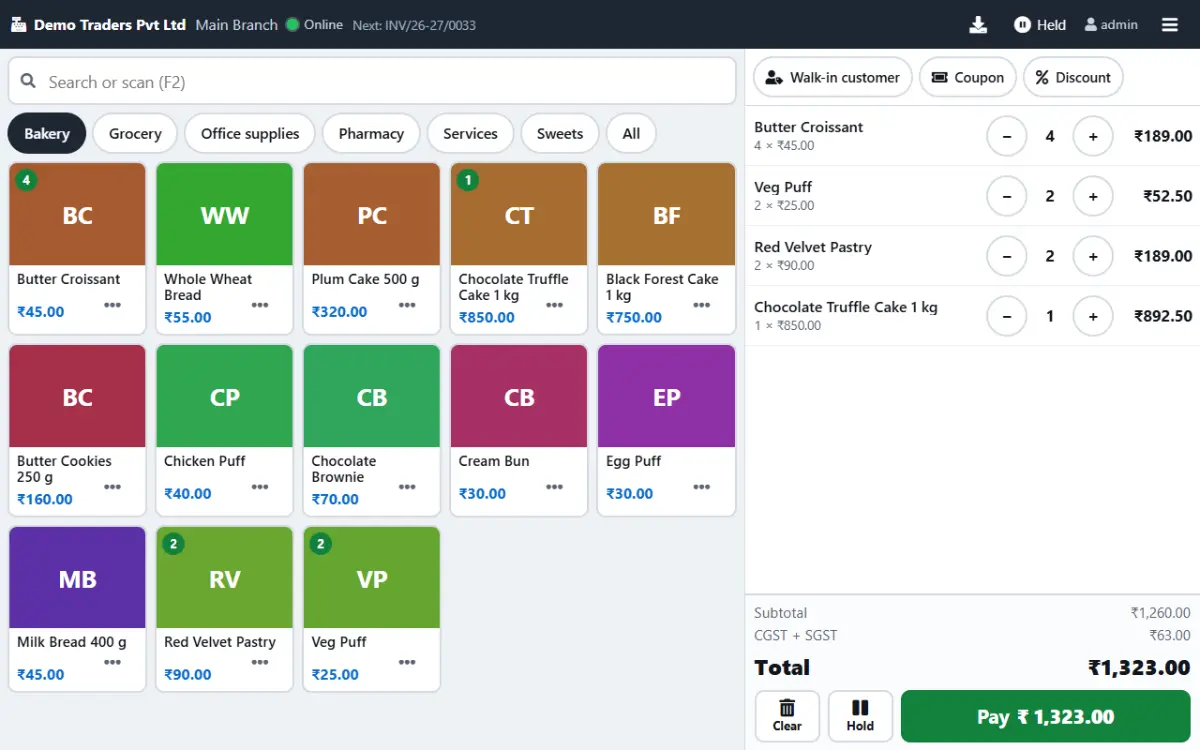
Paybot gives your bakery counter a touch screen billing system that keeps up with the evening rush: tap a photo, weigh, take UPI and print. Every bill is a proper GST invoice, so stock, loyalty points and reports stay right without extra work.
What a bakery counter needs
Three problems every bakery owner knows, and how Paybot handles each one.
The queue builds at 6 pm
Typing item names or hunting through a printed price list slows every bill just when the counter is busiest.
With Paybot: Big photo tiles, a Favourites tab and top sellers first. Most bills are a few taps and Pay.
Cakes and cookies sold by weight
Working out the price of 350 g of cookies on a calculator invites mistakes and arguments at the counter.
With Paybot: Enter grams or kilograms, or type a rupee amount and Paybot works out the quantity. Scale barcodes are read straight from the label.
Short shelf life
Bread, cream cakes and packaged snacks expire fast, and old stock hides at the back of the rack.
With Paybot: Batch-wise stock with expiry dates, first-expiry-first-out batch selection and a near-expiry report.
Bakery features that matter at the counter
All of this is part of the standard product. Tap a card for the full details on the features page.
Touch POS with photos
A product grid with photos and categories, big buttons and no keyboard needed. Runs on Android tablets and Windows touch screens.
Sold by weight
Bill in g or kg, by rupee amount, or from scale barcodes. Loose rusk and cookies need no fixed pack size.
Hold and resume bills
Park a bill while a customer picks one more pastry, serve the next person, then resume it at any counter.
UPI QR on screen
The UPI QR for the bill total shows on the POS. Cash, UPI and card tiles with quick tender and split payments.
Auto-print 80 mm receipts
The receipt prints the moment payment is taken, or the bill goes out on WhatsApp instead of paper.
Loyalty points
Regulars earn points on every bill and redeem them as a discount, with bonus-point offers on bills above a minimum value.
Batch and expiry
Track batches and expiry dates for packaged goods and bought-in ingredients, with a near-expiry report.
Daily baking as production
Record a baking run against its recipe (a bill of materials): ingredients come off stock and the finished batch gets its own expiry date.
Keeps billing offline
Install the POS as an app on the counter device. If the internet drops, billing carries on and the bills sync later.
How billing works at the bakery counter
From the first customer of the morning to the day's sales figures.
Cashier signs in
The cashier role opens straight on the POS screen, with no admin menus to wander into.
Tap, weigh, add
Tap a cake tile, enter 750 g or ₹200, or scan a scale label. Hold the bill if the customer is still choosing.
Take payment
Cash, UPI or card, or split across two. Quick-tender buttons show the change due.
Receipt and records
The 80 mm receipt prints, stock drops, loyalty points are added and the sale shows in the daily sales report.
Plans and pricing
Plans depend on how many people and companies use Paybot, and whether it runs on our cloud or your own servers.
Questions bakery owners ask
How is GST worked out on bakery items?
Each product carries its own HSN code and GST rate, so bread, cakes, biscuits and packaged snacks can sit on one bill at different rates. Paybot splits the tax into CGST and SGST for counter sales and reports it in GSTR-1, GSTR-3B and the HSN summary. If your bakery is under the composition scheme, Paybot issues bills of supply instead.
Will it work when the internet goes down?
Yes. The touch POS installs as an app (PWA) on the counter device and keeps billing offline. Bills made offline sync to your account when the connection returns.
Which printers and tablets can I use?
Paybot prints 80 mm thermal receipts and A4 invoices through the device's normal print settings, so a printer your tablet or PC can already print to will work. The touch POS runs on Android tablets and Windows touch screens, and a USB or Bluetooth barcode scanner works like a keyboard.
Who owns the sales data?
You do. Each company gets its own database, on our cloud or on your own server with the Enterprise plan. Backup, restore and Excel export are built in.
Can I send figures to my accountant's Tally?
Yes. Paybot has a Tally export, and every report downloads as Excel or CSV.
We have two outlets. Can they share one system?
Yes. Stock is kept per outlet, bill numbers can run per outlet, and stock moves between outlets with transfers. Several outlets usually need more than one user, which is the multi-user plan: contact us for pricing.
Related pages
Paybot is one product. Other businesses use the same features in a different way, and these features matter most in this line of business.
Sweet shop
Weight billing, scale barcodes and hold bills for the festival rush.
Café & restaurant counter
Fast counter billing, split payments and a daily sales report.
Retail & supermarket
Barcodes, MRP, schemes, loyalty points and multi-branch stock.
Touch POS
Finger-first billing on Android tablets and Windows touch screens.
Offline billing
Keep billing at the counter when the internet drops, then sync.
Inventory management
Batch, serial and multi-branch stock with weighted-average cost.
See Paybot set up for a bakery
Message us on WhatsApp and we will show you the touch POS with cakes, breads and puffs like yours. Or call +91 80755 95200.