
Recurring billing & subscription invoicing software
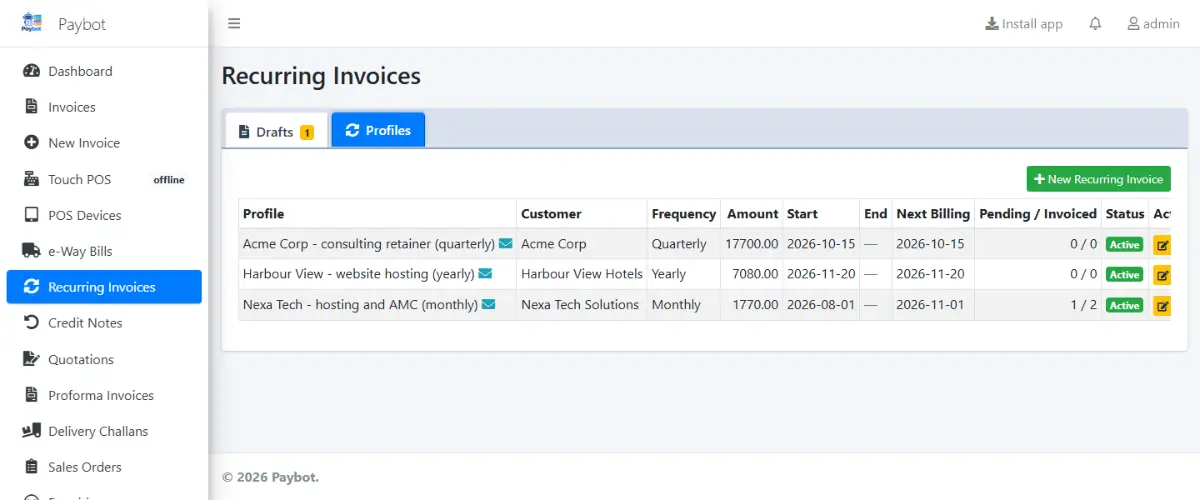
Set up a billing profile once and Paybot raises the invoice every month, quarter, half-year or year. Customers get an email with a Razorpay link, and when they pay, the invoice and receipt are created for you.
What a subscription business needs
Recurring revenue only works if billing and collection run without someone remembering them.
Invoices forgotten or late
Monthly retainers and AMCs slip when billing depends on a calendar reminder.
With Paybot: Profiles create a draft on every billing date, catch up on missed dates and never bill the same period twice.
Chasing payment by phone
Customers mean to pay but the invoice is buried in their inbox.
With Paybot: The invoice email carries a Pay online button. Payment reminders and statements go out on a schedule to overdue customers.
Payments not matched
Money arrives in the bank and someone has to work out which invoice it was for.
With Paybot: A Razorpay payment on the link converts the draft to an invoice, records the receipt and emails it. Duplicate confirmations are ignored.
Recurring billing features
Profiles, payment links and follow-up in one place.
Billing profiles
Monthly, quarterly, half-yearly or yearly, with a start date, an optional end date, pause and resume.
Invoice template
Each profile stores the full invoice: items, GST, TDS and the billing period in the subject line.
Automatic emails
Each draft is emailed with the items, totals, your bank details and, if you want, a pay-online button.
Razorpay pay links
A pay-online link on each recurring email, and on any standard invoice too.
Convert on payment
When the customer pays, the draft becomes an invoice, the payment is recorded and a receipt is emailed.
Payment reminders
Scheduled reminders and statements for overdue customers by email, SMS or WhatsApp.
Customer portal
Customers sign in with a one-time code to see invoices, download PDFs, check balances and pay.
Every payment mode
Record cash, UPI, card, NetBanking, cheque or Razorpay, and allocate advances to invoices.
TDS on service bills
TDS deducted by customers recorded on receipts, with a TDS receivable register.
How recurring billing works in Paybot
From profile to paid invoice without manual steps.
Create the profile
Choose the customer, items, interval and start date, and tick email and payment link.
Paybot raises the draft
On each billing date a draft is created and, if you chose it, emailed with a pay link.
Customer pays
The customer pays through Razorpay, or by bank transfer and you convert the draft yourself.
Invoice and receipt
The draft becomes a numbered GST invoice, the receipt is recorded and a copy goes to the customer.
Why Paybot
Subscription billing on your own books.
Your data, your server
Each company gets its own database, on our cloud or self-hosted on your own servers, with backups and Excel export built in.
Controls for owners
Role-based permissions, an audit trail of every change, and paid or filed documents that need Approve rights to change.
Payments checked at the source
A payment counts only after Paybot confirms it with Razorpay, so a forged callback cannot mark an invoice paid.
Plans and pricing
Plans depend on how many people and companies use Paybot, and whether it runs on our cloud or your own servers.
Recurring billing questions
Which intervals are supported?
Monthly, quarterly, half-yearly and yearly. Billing dates are always counted from the start date, so a profile starting on the 31st bills on each month-end.
Do drafts affect my books before they are invoices?
No. Drafts are not posted to the ledger, stock or GST reports until they are converted, and a draft converts only once.
What do I need for payment links?
A Razorpay account. Its keys are added to your Paybot set-up, and email must be configured for the links to be sent.
What if a customer pays by bank transfer instead?
Convert the draft yourself and record the payment. Paybot cancels the unpaid Razorpay link so the customer cannot pay twice.
Can I change the price of a subscription?
Yes. Edit the profile and pending drafts pick up the new price, unless they were already emailed with a pay link, which keeps the amount the customer was asked to pay.
Is GST applied to recurring invoices?
Yes. Recurring invoices are normal GST invoices with SAC codes, the right tax split and TDS where the customer deducts it.
Related pages
Where this part of Paybot fits for other businesses and features.
GST billing
CGST, SGST, IGST, HSN and GSTR-1 / 3B exports from your invoices.
e-Invoice & e-Way Bill
IRN, signed QR and e-Way Bills straight from the invoice screen.
Android app
Paybot on Android phones and counter tablets.
Services & subscriptions
Recurring invoices, pay links, reminders and a customer portal.
Wholesale & distribution
B2B invoices, e-Invoice, e-Way Bill, credit limits and party rates.
Manufacturing
BOM, production orders, job work and component stock deduction.
See recurring billing in action
Message us on WhatsApp and we will set up a profile and a Razorpay link with sample data. Or call +91 80755 95200.