
Android billing app
The Paybot Android app puts your whole billing system on a phone or a counter tablet. It keeps you signed in, saves PDFs to Downloads, prints receipts and turns a tablet into a touch POS that stays on screen all day.
Get the Paybot Android app
The app is set up for your company's own Paybot address, so we hand it over as part of onboarding.
Google Play
Paybot is coming to Google Play. The listing will appear here once it is published.
Coming soon on Google PlayAsk us for the app
Message us on WhatsApp and we will send the Android app for your business and help you set up the first device.
Book a demoWhat the Android app does
It is the full Paybot web app in an Android shell, with the phone features a browser tab handles badly.
Signing in every time
A browser on a shared tablet forgets the session or asks for the password again and again.
With Paybot: The app keeps the sign-in cookie across restarts until you sign out or the session ends.
PDFs and prints that go nowhere
Invoice PDFs and print buttons often do nothing useful in a mobile browser.
With Paybot: Downloads go to the phone's Downloads folder. Print opens Android's print dialog, where you print or save as PDF.
Counter tablets that wander
A tablet at the counter shows notifications, dims its screen and lets staff open other apps.
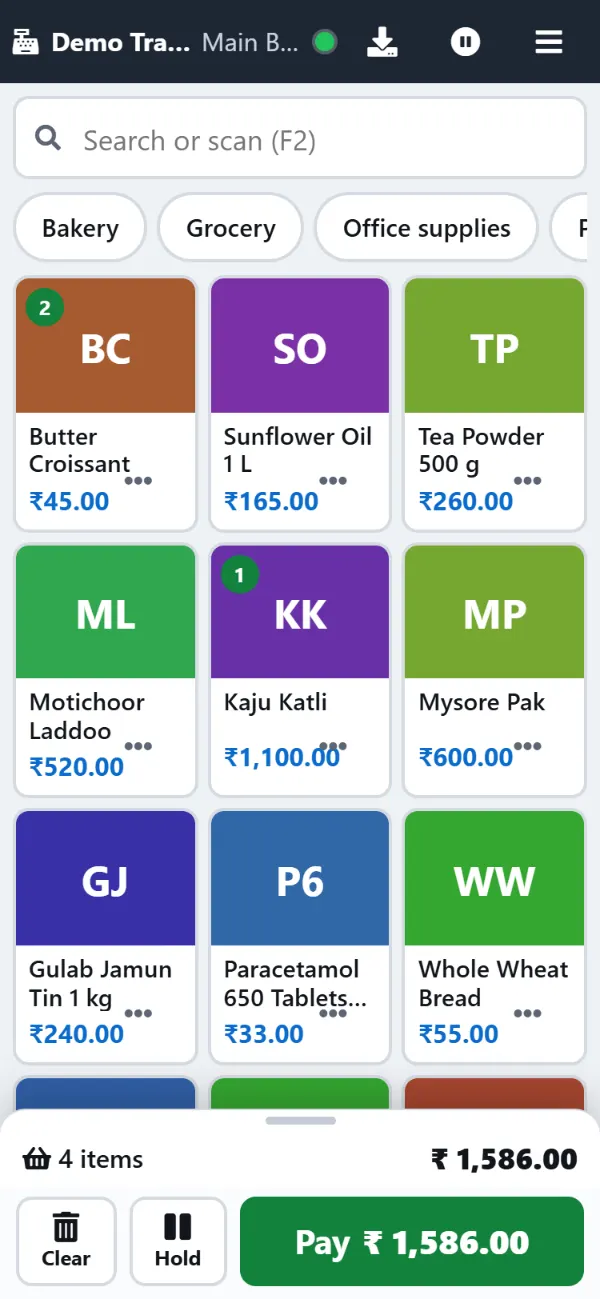
With Paybot: On the touch POS the app hides the system bars and keeps the screen on. With screen pinning the cashier stays in Paybot.
Android app features
Everything in Paybot works in the app. These are the parts made for Android.
Saved login
Stay signed in across app restarts. OTP login works as it does on the web.
Downloads
Invoice and receipt PDFs and Excel exports are saved to Downloads and opened.
Printing
Print invoices, receipts and reports through Android's print dialog, or save them as PDF.
File uploads
Attach expense bills and purchase scans from the phone's file picker.
Counter mode
On the touch POS the system bars hide and the screen stays on. The receipt prints while the POS stays on screen.
WhatsApp and calls
WhatsApp share, email and phone links open the right app on the phone.
Offline POS
After the first visit online, the touch POS keeps billing walk-in customers when the internet drops.
Same security
Your role and permissions are the same as on the web, and every change is in the audit trail.
Setting up a counter tablet
Recommended steps for an Android tablet used as a billing counter.
Install and sign in
Install the Paybot app we send you and sign in as the cashier. The cashier lands on the touch POS.
Pin the app
Turn on screen pinning (App pinning) in Android security settings and pin Paybot, so the cashier cannot leave it.
Pair the scanner
Pair a Bluetooth barcode scanner in keyboard (HID) mode. Scans reach the POS like typing.
Add the printer
Install the thermal printer's print service app from its maker, then pick the printer once in the print dialog.
Why Paybot
A billing app that is not a cut-down version.
Your data, your server
Each company gets its own database, on our cloud or self-hosted on your own servers, with backups and Excel export built in.
Controls for owners
Role-based permissions, an audit trail of every change, and paid or filed documents that need Approve rights to change.
The full product
There is no separate mobile edition. Reports, GST returns, inventory and settings are all there, limited only by your role.
Plans and pricing
Plans depend on how many people and companies use Paybot, and whether it runs on our cloud or your own servers.
Android app questions
Is the app on Google Play?
Not yet. It is coming to Google Play. Until then, message us on WhatsApp and we will send you the app set up for your company's Paybot address.
Which Android versions are supported?
Android 7.0 or newer, on phones and tablets.
Does the app work offline?
The touch POS does: once it has been opened online, walk-in billing continues offline and syncs later. Other screens need the internet and show a retry screen without it.
Can it print to a Bluetooth thermal printer?
Yes, through an Android print service for that printer, usually an app from the printer's maker or a generic ESC/POS print service. Android shows its print dialog for each print.
What permissions does the app ask for?
Internet and network status, and on older Android versions storage to save downloads. It does not use your location or contacts.
Is there an iPhone app?
Not as an app. Paybot works in Safari and other browsers on iPhone and iPad.
Related pages
Where this part of Paybot fits for other businesses and features.
Touch POS
Finger-first billing on Android tablets and Windows touch screens.
Offline billing
Keep billing at the counter when the internet drops, then sync.
POS billing
Barcode billing with GST, variants, MRP, loyalty and stock.
Bakery
Touch POS with photos, sold by weight, auto-print receipts.
Café & restaurant counter
Fast counter billing, split payments and a daily sales report.
Retail & supermarket
Barcodes, MRP, schemes, loyalty points and multi-branch stock.
Get Paybot on your phone
Message us on WhatsApp to book a demo and get the Android app set up for your business. Or call +91 80755 95200.