
Café & restaurant counter billing software
Paybot suits cafés, juice bars, tea stalls and quick-service counters where customers order and pay at the counter. It is counter billing: there is no table plan or kitchen order ticket (KOT) system.
What a café counter needs
Speed at the counter, control over the cash and a clear picture at closing time.
Orders at the counter, fast
A coffee order should take seconds, not a hunt through menus on a desktop screen.
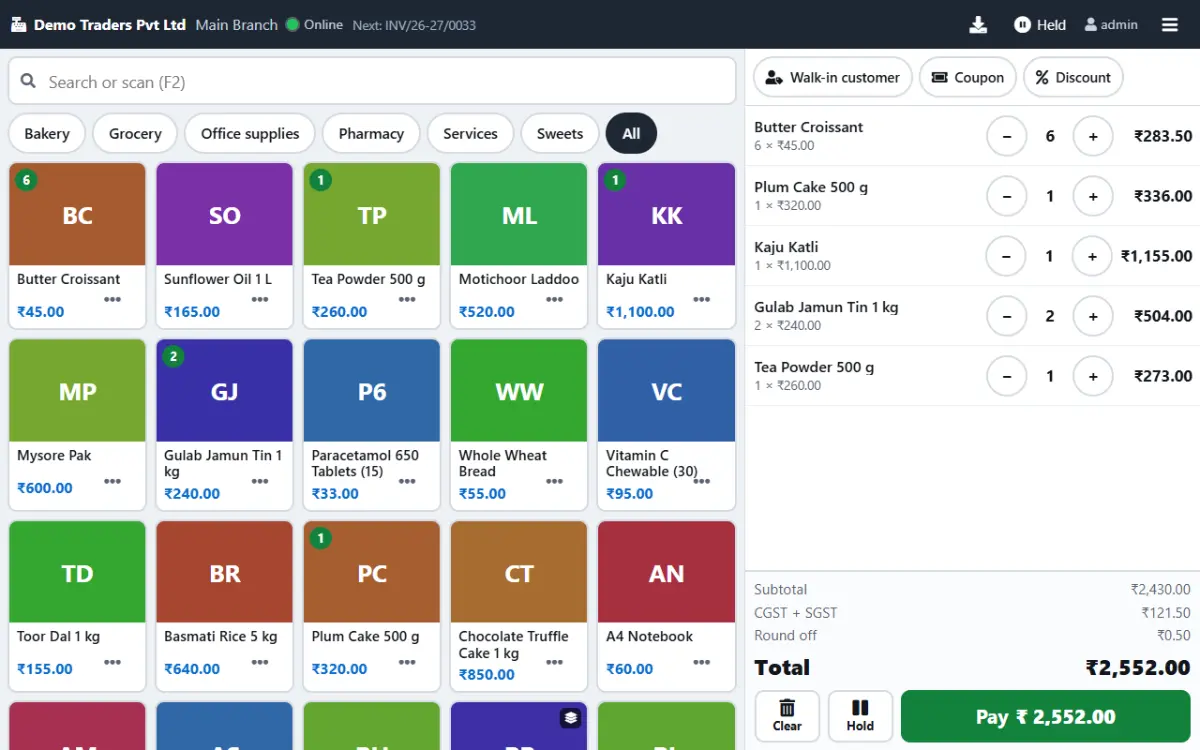
With Paybot: Menu items as photo tiles grouped by category: hot drinks, cold drinks, snacks. Tap, tap, Pay.
Staff handle the cash
Counter staff need to bill without seeing reports, settings or other users' data.
With Paybot: The cashier role lands straight on the POS after login with no admin menus. Owners see every change in the audit trail.
Where did the money go?
At closing time you need sales by payment mode, and a view of spending on milk, vegetables and gas.
With Paybot: The daily sales report splits cash, UPI and card. Expenses with GST and the day book show money in and out.
Café counter features
What a busy counter uses every day. Each card links to the full feature list.
Touch menu grid
Photo tiles by category with a Favourites tab for best sellers. Runs on Android tablets and Windows touch screens.
Cashier role
Cashiers open on the POS screen only. View, Write, Delete and Approve permissions keep sensitive actions with the owner.
Split payments
Take part cash and part UPI or card on one bill, with quick-tender buttons and the change due shown.
UPI QR on screen
The QR for the exact bill amount appears on the POS, so customers scan and pay.
WhatsApp the bill
Skip paper: take the phone number and send the bill on WhatsApp, or auto-print the 80 mm receipt.
Daily sales report
Invoices, sales, tax and collections by payment mode for the day, plus product-wise sales.
Recipes as bills of materials
Define a recipe once. Record each batch of cold coffee base or sandwich filling as production and the ingredients come off stock.
Expense tracking
Record milk, vegetables, gas and rent with GST and Input Tax Credit eligibility.
Day book and cash book
Every receipt, payment and expense of the day in one list, with separate cash and bank books.
How billing works at the café counter
The same four steps for one chai or a group order.
Open the POS
The cashier signs in on the counter tablet and lands on the menu grid.
Take the order
Tap each item and change quantities with + and −. Line discounts work only if you switch them on.
Collect payment
UPI QR on screen, cash with change due, card, or a split across two modes.
Close the day
Check the daily sales report by payment mode and post the day's expenses.
Plans and pricing
Plans depend on how many people and companies use Paybot, and whether it runs on our cloud or your own servers.
Questions café & restaurant counter owners ask
Does Paybot handle table service or KOTs?
No. Paybot is counter billing: the customer orders and pays at the counter. It has no table layout, kitchen order tickets or kitchen display. If your café takes orders at the counter, it fits well.
What GST does a café bill carry?
That depends on your registration and the item. Each menu item has its own GST rate and HSN or SAC code, set when you add it, and Paybot applies CGST and SGST on the bill and builds GSTR-1, GSTR-3B and the HSN summary from it. Under the composition scheme it issues bills of supply instead.
Can I keep billing offline?
Yes. The POS installs as an app and keeps billing when the internet drops. Bills sync once the connection is back.
Which hardware works?
An Android tablet or Windows touch screen, an 80 mm thermal receipt printer and, if you sell packaged items, a barcode scanner. Paybot prints through the device's normal print settings.
Can I track ingredient stock?
Yes, through production. Set each recipe up as a bill of materials and record what you prepare; Paybot deducts the ingredients and values the prepared item. Ingredients are not deducted automatically from each counter bill.
Do I get the data for my accountant?
Yes. Export reports to Excel or CSV, use the Tally export, and download GSTR-1 as JSON for filing.
Related pages
Paybot is one product. Other businesses use the same features in a different way, and these features matter most in this line of business.
Bakery
Touch POS with photos, sold by weight, auto-print receipts.
Sweet shop
Weight billing, scale barcodes and hold bills for the festival rush.
Retail & supermarket
Barcodes, MRP, schemes, loyalty points and multi-branch stock.
Touch POS
Finger-first billing on Android tablets and Windows touch screens.
Offline billing
Keep billing at the counter when the internet drops, then sync.
Android app
Paybot on Android phones and counter tablets.
See Paybot set up for a café counter
Message us on WhatsApp and we will show the touch menu with drinks and snacks like yours. Or call +91 80755 95200.