
e-Invoice (IRN) & e-Way Bill software
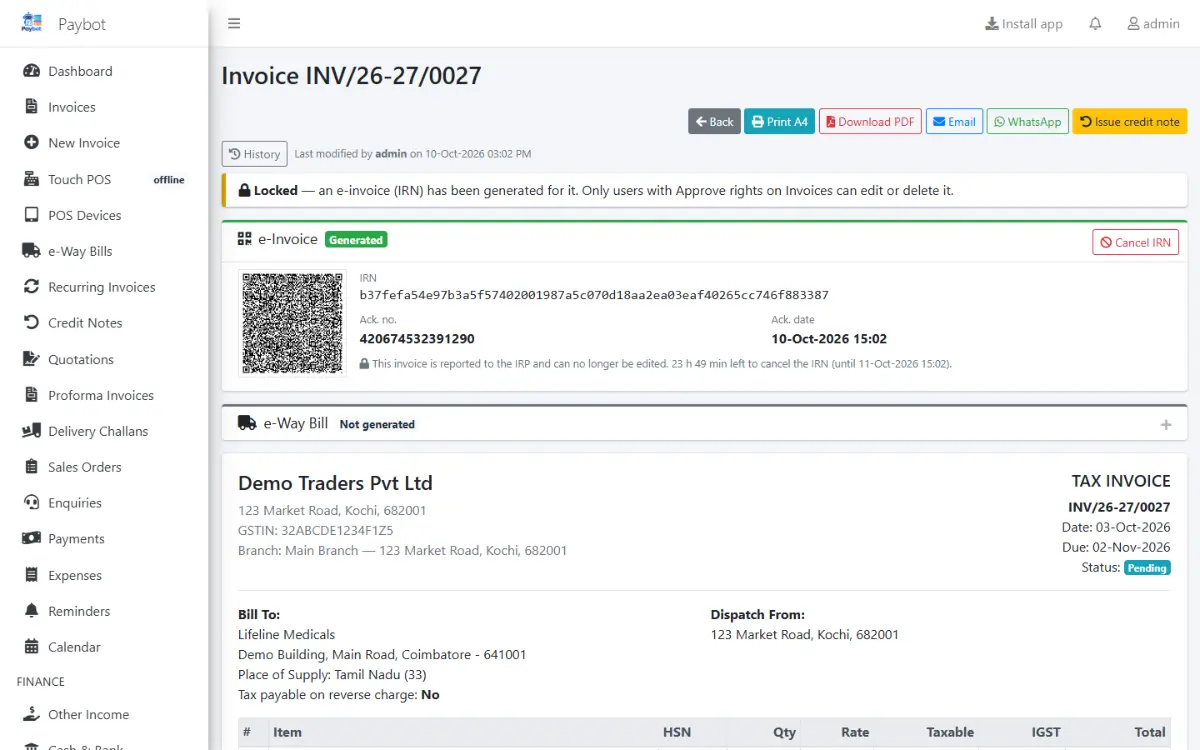
Generate the IRN, acknowledgement number and signed QR code from the invoice you just saved, and create the e-Way Bill from the same screen. Paybot keeps track of what is pending, what is about to expire and what has been cancelled.
What an e-invoicing business needs
Once your turnover brings you under e-invoicing, every B2B invoice has a second step. These are the parts that go wrong.
Copying invoices to the portal
Typing each invoice into the IRP or a separate tool doubles the work and the chance of a mismatch.
With Paybot: Paybot builds the e-invoice JSON from the saved invoice and sends it to the IRP. The IRN, Ack number and signed QR come back onto the invoice.
Missed reporting windows
An invoice not reported in time cannot get an IRN, and nobody notices until the customer asks for it.
With Paybot: A watch list shows pending and failed e-invoices with their report-by date, a banner warns on the dashboard and admins get a daily email.
e-Way Bills that expire on the road
A truck held up for a day can leave the goods without a valid e-Way Bill.
With Paybot: Bills expiring today show on the dashboard. Extend from 8 hours before expiry, update Part-B with a new vehicle or cancel within 24 hours.
e-Invoice and e-Way Bill features
Both live on the invoice itself, with lists for the bulk work.
IRN and signed QR
IRN, Ack number and date, and the signed QR on the A4 print and PDF, for invoices and credit notes.
Generate on save
Optionally generate the IRN as soon as an invoice is saved, or tick several invoices and generate them together.
Cancel an IRN
Cancel within 24 hours with the reason code. Paybot stops edits to an invoice with a live IRN.
Readiness check
Before anything is sent, Paybot lists missing GSTINs, PIN codes, HSN codes or invalid document numbers.
e-Way Bill
Transport details, vehicle and distance, e-Way Bill by IRN, Part-A only when the vehicle is not known yet.
Part-B, extend, cancel
Update the vehicle, extend near expiry, cancel within 24 hours or record a number made on the portal.
Bulk JSON
Export selected documents as the portal's bulk upload file when you prefer the portal route.
GSTIN validation
Check-digit validation and an online taxpayer lookup before the invoice is saved.
Challans and transfers
e-Way Bills for delivery challans and branch stock transfers as well as invoices.
How e-invoicing works in Paybot
Set it up once, then it is one button on each invoice.
Connect the API
Enter your e-invoice API credentials under Admin, GST API, and switch e-invoicing on with its start date.
Save the invoice
B2B, SEZ, export and deemed export invoices are marked as pending e-invoice automatically.
Generate the IRN
Click Generate, or let Paybot do it on save. The IRN and QR appear on the invoice and its print.
Add the e-Way Bill
Fill the transport card and generate the e-Way Bill, or leave Part-B for when the vehicle is assigned.
Why Paybot
e-Invoicing without a second system.
Your data, your server
Each company gets its own database, on our cloud or self-hosted on your own servers, with backups and Excel export built in.
Controls for owners
Role-based permissions, an audit trail of every change, and paid or filed documents that need Approve rights to change.
Every call is logged
Each request to the IRP or e-Way Bill system is logged with its response, so a rejected invoice shows exactly what the portal said.
Plans and pricing
Plans depend on how many people and companies use Paybot, and whether it runs on our cloud or your own servers.
e-Invoice & e-Way Bill questions
Who has to issue e-invoices?
Businesses whose aggregate turnover crosses the limit notified under current GST rules must report B2B invoices, credit notes and exports to the Invoice Registration Portal. Check the current threshold with your accountant; Paybot lets you switch e-invoicing on from the date it applies to you.
What do I need to connect Paybot to the IRP?
API credentials for e-invoicing and e-Way Bills for your GSTIN, entered once under Admin, GST API. We help set this up during onboarding.
Can I cancel an e-invoice?
Yes, within 24 hours of the acknowledgement, with a reason code. After that the correction is a credit note, which Paybot can also report.
Does Paybot create e-Way Bills without e-invoicing?
Yes. e-Way Bills work for any goods invoice, delivery challan or branch transfer, with or without an IRN. Paybot reminds you when a goods invoice above ₹50,000 has no e-Way Bill.
What if the portal rejects an invoice?
The portal's error is stored on the invoice and shown with a Retry button. Fix the field it names and try again.
Can I still upload files to the portal myself?
Yes. Selected documents export as the e-Way Bill bulk JSON, and GSTR-1 exports as JSON or Excel.
Related pages
Where this part of Paybot fits for other businesses and features.
GST billing
CGST, SGST, IGST, HSN and GSTR-1 / 3B exports from your invoices.
Inventory management
Batch, serial and multi-branch stock with weighted-average cost.
Recurring billing
Subscription invoices, Razorpay links and automatic reminders.
Wholesale & distribution
B2B invoices, e-Invoice, e-Way Bill, credit limits and party rates.
Manufacturing
BOM, production orders, job work and component stock deduction.
Services & subscriptions
Recurring invoices, pay links, reminders and a customer portal.
See e-invoicing on a sample invoice
Message us on WhatsApp and we will show IRN, QR and e-Way Bill generation end to end. Or call +91 80755 95200.