
GST billing software: CGST, SGST, IGST, GSTR-1 & 3B
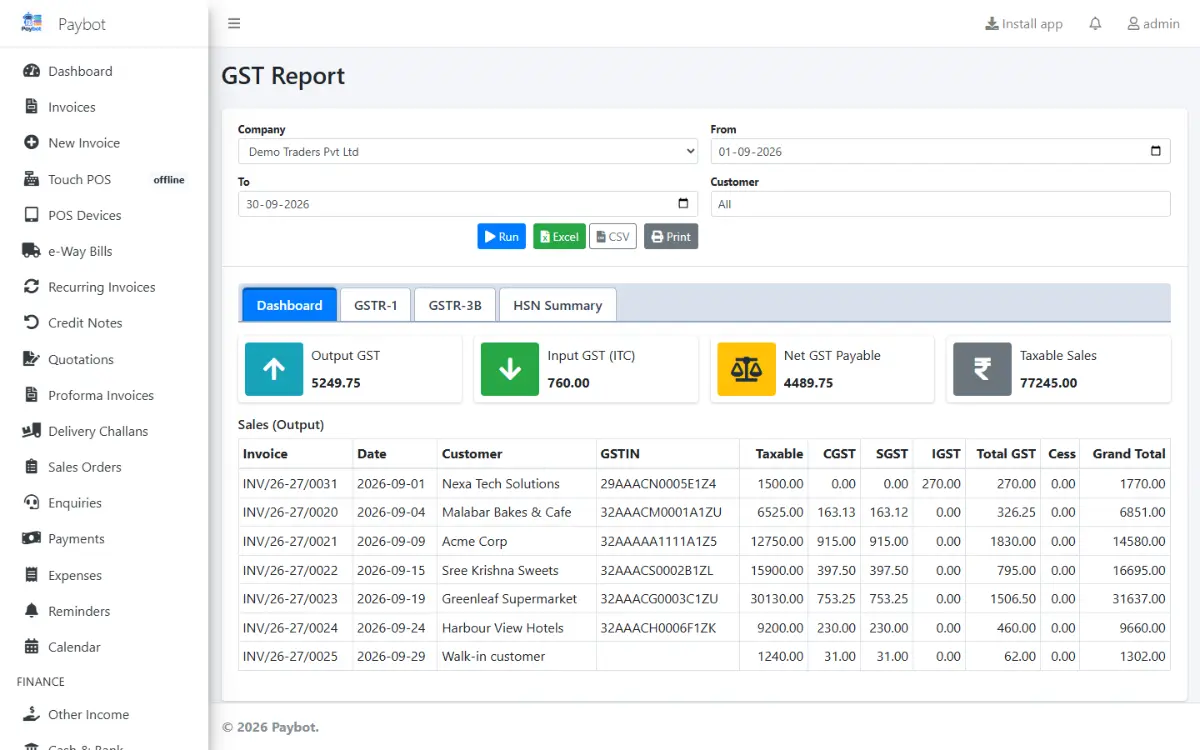
Paybot works out GST from the seller's state and the place of supply, so every invoice gets the right CGST, SGST or IGST split. The same invoices then become your GSTR-1 file, your GSTR-3B figures and your HSN summary, ready for the portal.
What a GST-registered business needs
GST billing is easy to get almost right. These are the places where small mistakes turn into notices and lost credit.
Wrong tax head
Charging CGST and SGST on a sale to another state, or IGST on a local sale, means a credit note and a corrected return.
With Paybot: Paybot compares your state with the place of supply on every invoice and applies CGST + SGST or IGST. Exports and SEZ supplies are always IGST.
Returns rebuilt by hand
Copying invoices into the GST offline tool every month takes hours and invites typing errors.
With Paybot: GSTR-1 downloads as the portal's JSON or the offline tool's Excel, after a check that flags missing HSN codes, bad GSTINs and number gaps.
Input credit you cannot claim
Supplier bills missing from GSTR-2B quietly cost you credit unless someone checks every month.
With Paybot: Upload GSTR-2B and Paybot matches it against your purchase register, lists what is missing on either side and drafts the reminder email to the supplier.
GST features in Paybot
From the HSN master to the filed month, all inside your billing software.
CGST, SGST and IGST
Automatic split by place of supply, with the state and state code printed on the invoice.
HSN and SAC master
GST rates per HSN or SAC code, cess, and nil-rated, exempt and non-GST items on the same bill.
Bill of supply
Composition and unregistered businesses issue bills of supply automatically, with the right legend.
Exports and SEZ
Export and SEZ invoices with or without IGST under LUT, shipping bill and port code, deemed exports and reverse charge.
GSTR-1 JSON and Excel
All GSTR-1 tables including B2B, B2CL, B2CS, exports, credit notes, nil-rated, HSN and documents issued.
GSTR-3B summary
Output tax, reverse charge and eligible ITC by table, with a suggested set-off and a JSON file.
GSTR-2B reconciliation
Match supplier bills with GSTR-2B, mark IMS actions and email suppliers about missing invoices.
GSTIN validation
Check-digit validation of GSTIN and PAN on save, and an online taxpayer lookup that fills the address.
Filed months locked
Mark GSTR-1 or GSTR-3B as filed and invoices of that month need Approve rights to change.
How a GST month works in Paybot
From the first invoice of the month to the files your accountant uploads.
Bill through the month
Invoices, credit notes and purchases carry HSN codes and the correct tax split as you save them.
Run the GSTR-1 check
The check lists errors and warnings with links to the documents, so you fix them before exporting.
Download the files
Download GSTR-1 JSON or Excel and the GSTR-3B summary, and reconcile purchases with GSTR-2B.
Mark the month as filed
After filing on the portal, mark the month. Paybot then protects those documents from casual edits.
Why Paybot
GST billing your accountant can trust.
Your data, your server
Each company gets its own database, on our cloud or self-hosted on your own servers, with backups and Excel export built in.
Controls for owners
Role-based permissions, an audit trail of every change, and paid or filed documents that need Approve rights to change.
Figures that tie out
Taxable value and tax agree between the invoices, the HSN summary, GSTR-1 and GSTR-3B, because they are all read from the same documents.
Plans and pricing
Plans depend on how many people and companies use Paybot, and whether it runs on our cloud or your own servers.
GST billing questions
Does Paybot file my GST returns?
No. Paybot prepares GSTR-1 as the portal's JSON or the offline tool's Excel and works out the GSTR-3B figures. You or your accountant upload and file them on the GST portal, then mark the month as filed in Paybot.
How does Paybot decide between CGST + SGST and IGST?
It compares your company's state with the place of supply. The same state gives CGST and SGST; another state, an export or an SEZ gives IGST. The place of supply defaults from the customer and can be changed on the invoice.
We are under the composition scheme. Can we use it?
Yes. Set the company's GST scheme to composition and Paybot issues bills of supply without GST, with the composition legend. Businesses not registered for GST get plain invoices.
Can I bill items at different GST rates on one invoice?
Yes. Each line takes the rate from its HSN code or the product, including nil-rated, exempt and non-GST lines, and cess where it applies.
Does it handle e-Invoice and e-Way Bill?
Yes. IRN generation, the signed QR and e-Way Bills are covered on the e-Invoice page, and they work from the same invoice screen.
Can my accountant use Tally?
Yes. Paybot exports masters and vouchers in Tally's XML format, and every report downloads as Excel.
Related pages
Where this part of Paybot fits for other businesses and features.
e-Invoice & e-Way Bill
IRN, signed QR and e-Way Bills straight from the invoice screen.
POS billing
Barcode billing with GST, variants, MRP, loyalty and stock.
Recurring billing
Subscription invoices, Razorpay links and automatic reminders.
Wholesale & distribution
B2B invoices, e-Invoice, e-Way Bill, credit limits and party rates.
Pharmacy
Batch, expiry and MRP with FEFO and a near-expiry report.
Retail & supermarket
Barcodes, MRP, schemes, loyalty points and multi-branch stock.
See your GST month in Paybot
Message us on WhatsApp and we will walk you through invoices, GSTR-1 and GSTR-2B with sample data. Or call +91 80755 95200.