
Billing software for service businesses & subscriptions
Paybot suits agencies, AMC and maintenance contractors, consultants, internet providers, coaching centres and anyone who bills the same customers every month. Recurring invoices go out on time with a pay link, and reminders chase the rest.
What a service business needs
Regular invoices, faster collections and less time matching TDS.
Monthly invoices go out late
Every month someone copies last month's invoices, changes the dates and sends them, and some get missed.
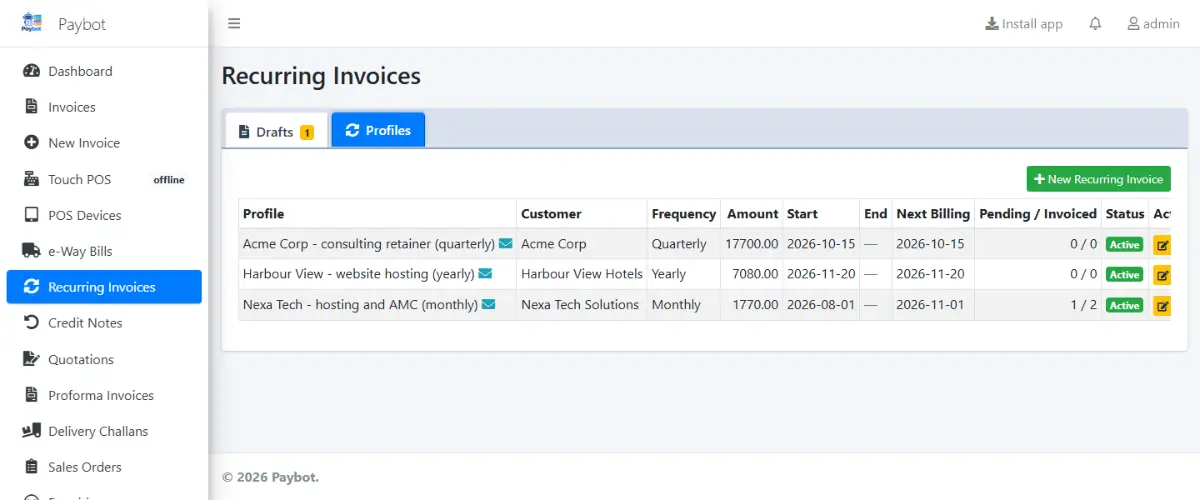
With Paybot: Recurring profiles (monthly, quarterly, half-yearly or yearly) create the drafts on schedule, with catch-up for missed runs.
Chasing payments
Customers say they never got the invoice, or that the bank details were wrong.
With Paybot: Every invoice can carry a Razorpay link and a UPI QR. Scheduled reminders and statements go to overdue customers.
TDS and short receipts
Corporate clients deduct TDS, and matching the shortfall against invoices takes hours.
With Paybot: TDS section and percentage on the invoice, a TDS receivable register, and receipts allocated across invoices.
Features for service businesses
Recurring revenue, online payments and client follow-up in one place.
Recurring billing profiles
Start and end dates, a next run date, a line template and billing period text on each invoice.
Razorpay pay links
Pay links on recurring and standard invoices. A confirmed payment turns the draft into an invoice and records the receipt.
Automated reminders
Scheduled payment reminders and statements for overdue customers, by email or WhatsApp.
Customer portal
Customers sign in to view invoices, download PDFs, check balances and accept quotes.
Quotations to invoice
Send a quotation or proforma, then convert it to an invoice in one click once the client agrees.
TDS on invoices
TDS percentage and amount on the invoice, with a receivable register by quarter.
SAC codes for services
Services carry SAC codes and their GST rate, and appear in the HSN / SAC summary.
Expense management
Record expenses with GST and Input Tax Credit eligibility, and attach the bill.
Enquiries and follow-ups
Capture leads with a category and status, schedule follow-ups on the calendar and keep the email history.
How billing works in a service business
From the first quote to the monthly invoice that pays itself.
Quote
Send a quotation from Paybot. The client can accept it in the customer portal.
Set up the profile
Turn the agreed work into a recurring profile with the schedule, line items and start date.
Bill and get paid
Drafts are created on schedule and sent with a Razorpay link. Once paid online, the draft becomes an invoice with the receipt recorded.
Follow up
Reminders go to anyone overdue, and the customer hub shows invoices, payments and emails in one place.
Plans and pricing
Plans depend on how many people and companies use Paybot, and whether it runs on our cloud or your own servers.
Questions services & subscriptions owners ask
Which billing cycles are supported?
Monthly, quarterly, half-yearly and yearly. Each profile has a start date, an optional end date and a next run date that Paybot recalculates if you edit the schedule.
What happens when a customer pays online?
Once Razorpay confirms the payment, through the return page or a background check, Paybot converts the draft into a numbered invoice and records the payment. Duplicate confirmations are ignored.
How is GST handled on services?
Each service has its SAC code and GST rate. Paybot applies CGST + SGST or IGST from the client's place of supply and reports it in GSTR-1, GSTR-3B and the HSN / SAC summary.
My clients deduct TDS. Can Paybot track it?
Yes. Put the TDS section and percentage on the invoice, and the TDS receivable register tracks what was deducted by quarter so you can check it against Form 26AS.
Can I export to Tally?
Yes. Paybot has a Tally export, and invoices, payments and reports export to Excel.
Who can see client data?
Only the users you create, with View, Write, Delete and Approve permissions per module. Logins are recorded with IP address and time, and optional email OTP adds a second step.
Related pages
Paybot is one product. Other businesses use the same features in a different way, and these features matter most in this line of business.
Wholesale & distribution
B2B invoices, e-Invoice, e-Way Bill, credit limits and party rates.
Manufacturing
BOM, production orders, job work and component stock deduction.
Retail & supermarket
Barcodes, MRP, schemes, loyalty points and multi-branch stock.
Recurring billing
Subscription invoices, Razorpay links and automatic reminders.
GST billing
CGST, SGST, IGST, HSN and GSTR-1 / 3B exports from your invoices.
e-Invoice & e-Way Bill
IRN, signed QR and e-Way Bills straight from the invoice screen.
See Paybot set up for your services
Message us on WhatsApp and we will set up a recurring profile and pay link for a client like yours. Or call +91 80755 95200.